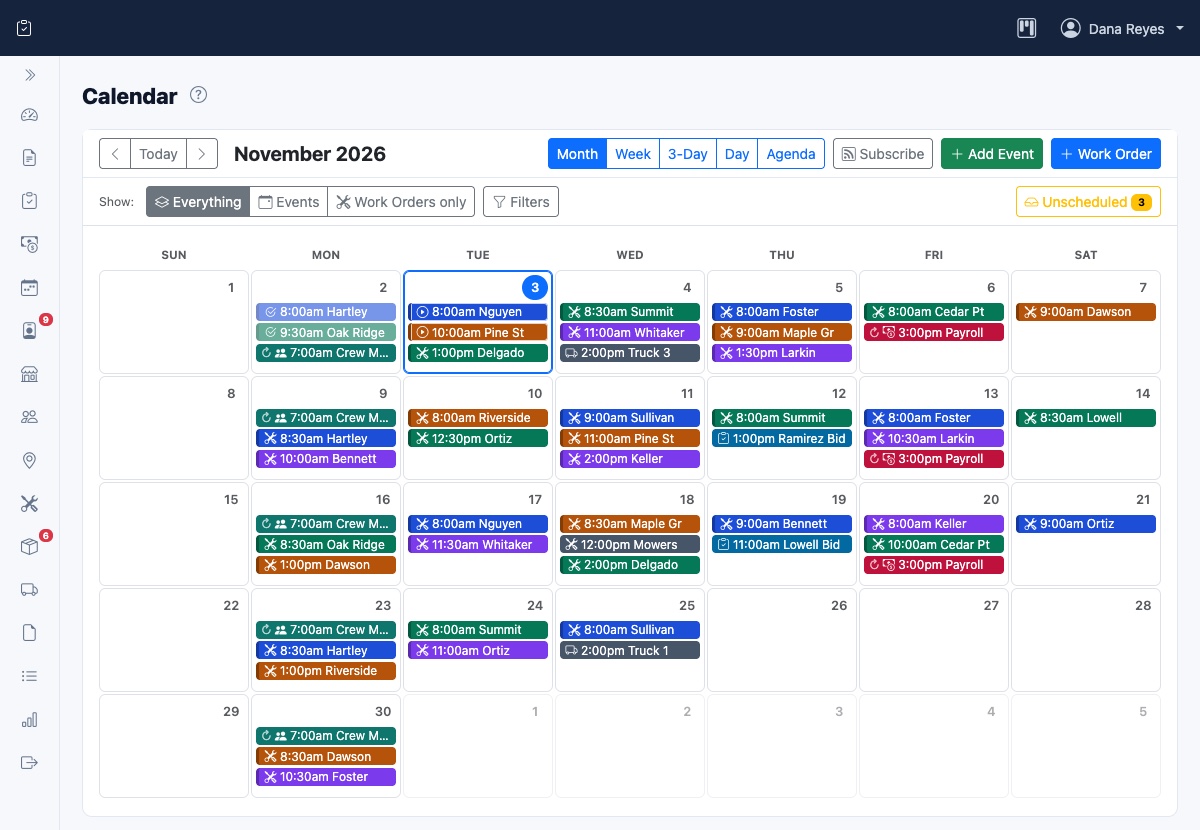
Field service scheduling and dispatch comes down to two questions: who should do which job, and when? The schedule is your plan for the day. Dispatch is everything you do to carry out that plan and keep it working once the day starts. Most service businesses handle both from memory for a while. Then a second crew or a busy season arrives, and the cracks show up as late arrivals, wasted drive time and customers calling to ask where you are.
You don't need a dedicated dispatcher or expensive software to fix this. You need a repeatable routine. This guide walks through one you can run from a whiteboard, a spreadsheet or a software system.
Field service scheduling and dispatch: what's the difference?
The two jobs are closely linked, but they happen at different times and call for different thinking.
- Scheduling happens ahead of time. You decide which jobs go on which day, who does them and in what order.
- Dispatch happens on the day. You send crews out with the details they need, track progress and adjust when something changes.
In a small business, the same person often does both. It still helps to treat them as separate tasks. A schedule built in a quiet hour the afternoon before will be better than one assembled at 7 a.m. with the phone ringing.
How to build a field service schedule that holds up
A good schedule isn't the one with the most jobs on it. It's the one your crews can actually finish. Build it in this order:
- Start with fixed commitments. Place booked appointments, jobs with a promised time and recurring customers first. Everything else fits around them.
- Match the job to the crew. Check the skills, licenses, equipment and vehicle each job requires before you assign it. Finding out on site that the crew doesn't have the right gear costs you the whole trip.
- Estimate job length from your own history. Use how long similar jobs really took, not how long they should take. If you have no records yet, start writing down actual times this week.
- Add the drive time. Count the travel between jobs as part of the schedule, not as a gap between entries on it.
- Leave some slack. Keep part of each day unbooked. Jobs run long and urgent calls come in. Without any room, one delay pushes every later customer back.
Give customers a window, not a promise
An arrival window, such as 8 to 10 a.m., is easier to keep than an exact time. Keep windows only as wide as you need them, then tell the customer as soon as you know you'll miss one. Most people are far more forgiving of a heads-up than of an empty driveway.
Plan routes to cut drive time
Every minute on the road is a minute you are paying for but can't bill. In the United States, time spent traveling from job site to job site during the workday generally counts as hours worked, as the Department of Labor explains. State rules can add to this, so confirm what applies to you.
A few habits make the biggest difference:
- Group work by area. Assign each crew a part of your service area on a given day. Offer new customers the day you are already nearby.
- Order stops the way the crew drives. Avoid crossing back over the same ground, and start the route with the job closest to where the crew begins.
- Turn regular work into set routes. For weekly mowing, pool service or cleaning rounds, keep the same order each time so nobody has to rebuild it. Work lists and routes are one way to generate a whole day of recurring jobs at once.
A daily dispatch routine
Dispatch goes more smoothly when the same things happen in the same order every day.
The afternoon before
Review tomorrow's schedule against who is actually available and which vehicles are working. Confirm appointments with customers and fix conflicts while you still have time to call people.
Before crews roll out
Give each crew lead the full plan, not just a list of addresses. Every job should come with:
- The address, plus any gate or access codes
- The customer's name and how to reach them
- The services to perform and any notes about the property
- The arrival window
- The materials and equipment the job needs
Putting those details in a work order on the crew's phone means fewer calls back to the office. An employee mobile dashboard does this job well, but a shared document beats details scattered through text messages.
During the day
Check progress at set points rather than waiting for problems to reach you. Ask crews to mark jobs as started and finished, so the office can see who is running behind without phoning anyone. Then, at the end of the day, compare what was planned with what happened. Update your job length estimates and make sure every finished job moves on to invoicing.
How to handle last-minute changes
Something will change on most days. Decide your rules ahead of time so you aren't making them up under pressure.
- A job runs long. Decide when the crew should call it in, for example once they're 30 minutes behind. Then check whether the next customer needs a call or whether another crew can take the job.
- An urgent call comes in. Look first for the nearest qualified crew with slack in its day. Quote a realistic window, and consider whether the job should carry an emergency rate.
- Someone calls in sick. Move fixed appointments to other crews first, then call the remaining customers to reschedule. Don't wait until the crew fails to appear.
- The weather turns. Tell customers before they notice nobody came, and rebook them in the same conversation. Weather cancellation alerts can handle the first part from the job site.
Common scheduling and dispatch mistakes
- Booking every hour. A day with no slack looks efficient until the first job runs over.
- Ignoring travel. Two jobs an hour apart can't be scheduled back to back, however short they are.
- Keeping the plan in one person's head. When that person is out sick or on a job, nobody else can dispatch.
- Sending partial information. A missing gate code or part number can cost a full return trip.
- Losing track of finished work. A job that is done but not invoiced is work you did for free. A job board makes those stalled jobs easy to spot.
When to move beyond a whiteboard
Paper and spreadsheets are fine for one crew doing simple work. It's probably time for scheduling software when you notice these signs:
- You have several crews, and double-bookings or missed jobs keep happening.
- Crews call the office all day for details that should already be in their hands.
- Recurring jobs take hours to set up each week.
- Completed work takes days to turn into an invoice, or sometimes never does.
Look for a system that connects the schedule to the rest of the job: the estimate before it and the invoice after it. See how CommandForce connects those steps, or start free.
Frequently asked questions
What is the difference between scheduling and dispatch?
Scheduling happens ahead of time and decides which jobs go on which day, who does them and in what order. Dispatch happens on the day and covers sending crews out, tracking progress and adjusting when something changes.
How much slack should I leave in a field service schedule?
There is no single right number. Start by keeping part of each day unbooked, then compare your planned and actual job times each week and adjust until a normal delay no longer pushes back the rest of the day.
Should travel time between jobs be paid?
In the United States, travel from job site to job site during the workday generally counts as hours worked under federal rules. State rules can add to this, so confirm what applies to your business.